



Indoor Cycle Pros
Weight Holder for Stages Indoor Bikes | Studio Dumbbell Holder
#1 Rated Stages Weight Holder by Studio Owners
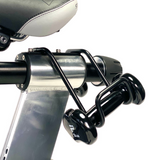
The Stages Compatible Weight Holder is a purpose-built accessory designed to provide secure and convenient weight storage directly on most Stages indoor cycling bikes. Built for high-use commercial environments, this stationary bike dumbbell rack allows riders to keep hand weights within easy reach during rides, making transitions between cycling and strength intervals smooth and efficient.
At Indoor Cycle Pros, we work directly with studio owners, gym operators, and fitness facilities all over the world. Based on our hands-on experience servicing thousands of Stages bikes, we recommend the Stages Compatible Weight Holder as the most reliable indoor cycling bike weight holder for organized and safe weight storage during indoor cycling classes.
Designed specifically for Stages bikes, this spin bike accessory mount integrates cleanly into your setup while maintaining the professional appearance expected in premium studio environments.
You can view full product specifications on our Stages Compatible Weight Holder product page.
Patented Weight Storage Rack for Stages Indoor Cycles
The Stages Weight Holder functions as a compact weight storage rack that mounts directly to compatible Stages indoor cycling bikes. Its smart design allows riders to safely store dumbbells or kettlebells used during interval training or upper-body workouts.
This accessory was engineered specifically for the following bikes:
- Stages SC1 Indoor Cycle
- Stages SC2 Indoor Cycle
- Stages SC3 Indoor Cycle
It fits securely across the Stages SC1, SC2 and SC3 lineup while keeping proper rider ergonomics.
Because the holder mounts directly to the bike frame, riders can quickly grab weights during class segments without leaving the saddle position. This feature is ideal for studio programs that combine cardio and strength training.
Heavy-Duty Steel Construction for Commercial Studios
Studio environments demand accessories that withstand heavy daily use. The Stages Weight Holder features durable steel construction, providing long-term reliability even in high-volume indoor cycling studios.
Key durability features include:
- Heavy-duty steel / metal construction
- Secure mounting hardware
- Commercial-grade finish
- Designed for high-use fitness environments
Unlike generic accessory racks, this indoor cycling bike weight holder was engineered specifically for commercial bikes and studio training conditions.
The rigid construction prevents flexing or shifting, ensuring that weights remain stable and secure throughout every class.
Ideal Weight Capacity for Studio Strength Intervals
The Stages Weight Holder is designed to safely support commonly used studio training weights, including:
- Dumbbells
- Light kettlebells
- Small weight plates
Most indoor cycling classes utilize weights between 2 and 8 pounds, which fall well within the intended weight capacity and load rating of the holder.
Properly storing these weights directly on the bike keeps the studio floor organized while eliminating clutter during classes. It also improves safety by preventing loose weights from being placed on the ground near riders.
Clean, Professional Studio Setup
A major advantage of the Stages Weight Holder is the organized layout it creates in the cycling studio.
Benefits include:
- Keeps workout accessories organized
- Improves the professional appearance of the studio
- Reduces floor clutter
- Allows quick access to weights during rides
For studios offering rhythm rides, HIIT cycling classes, or strength intervals, having an integrated stationary bike dumbbell rack improves both the rider experience and overall class efficiency.
Studio owners across the United States frequently choose the Stages Weight Holder because it maintains the clean aesthetic of Stages bikes while adding functional strength-training capability.
Why Studio Owners Buy from Indoor Cycle Pros
At Indoor Cycle Pros, we specialize in Stages indoor cycling bikes, parts, and accessories. Our team works directly with boutique studios, gyms, and fitness facilities across the United States, providing expert guidance on selecting the right components for long-term performance.
When you purchase the Stages Weight Holder through Indoor Cycle Pros, you receive:
- Stages accessories
- Expert compatibility guidance
- Fast shipping across the United States
- Commercial indoor cycling expertise
Our team supports studio owners who rely on Stages bikes to deliver premium indoor cycling experiences.
Lifetime Warranty: Studio-Grade Reliability
The Stages Weight Holder is built for long-term performance and includes a lifetime warranty, making it a dependable investment for studios and fitness facilities.
Whether you are outfitting a new cycling studio or upgrading existing bikes, this weight storage rack provides durability, organization, and a cleaner training environment.
In Stock: Fast Shipping
Indoor Cycle Pros maintains inventory of the Stages Weight Holder to ensure fast order fulfillment for studios, gyms, and cycling facilities across the United States.
Ordering from Indoor Cycle Pros means you receive authentic Stages accessories backed by industry expertise and reliable service.
CAN'T FIND WHAT YOU NEED?
We love to help! Send us an email at sales@indoorcyclepros.com now!
FAQs
Indoor Cycle Pros is the official direct distributor of Stages Cycling commercial indoor bikes for U.S. studios. We specialize in helping boutique studios and gyms source and maintain their bikes with expert phone support and prompt access to Stages parts.
Indoor Cycle Pros ships new Stages bikes nationwide across the United States, and delivers Stages parts and accessories to clients worldwide.
We exclusively carry Stages Cycling indoor bikes because Stages is the only fitness brand 100% focused on commercial indoor cycling. Unlike other manufacturers that produce treadmills, rowers, and ellipticals, Stages builds only indoor cycles—resulting in the most advanced and durable bikes on the market for studio use.
Absolutely not! Stages Cycling is thriving under the ownership of Giant Manufacturing Co., the world's largest bicycle manufacturer, established in 1972.
Yes, we provide ongoing support for Stages indoor bikes, including maintenance tips, troubleshooting help, and help finding the right replacement parts. Call (949) 922-7302 for expert phone support. Installation instructions and videos are available on request at sales@indoorcyclepros.com.
Yes, our finance team has supported studios and gyms since 2015 with the most competitive options for financing Stages bikes. To get started, fill out our Contact Form.
Both the Stages SC2 and Stages SC3 bikes share a commercial-grade frame but differ in rider features. SC2 is ideal for rhythm riders; SC3 for performance tracking and metrics.
SC2 Highlight: Black pop-pin adjustment knobs, RhythmBar™ handlebars, no console.
SC3 Highlight: Blue FitLoc™ levers, RoadBar™ handlebars, EcoSCRN console, and built-in power meter.
Each Stages bike includes a dual function pedal that offers both SPD cleat compatibility on one side and a toe cage with an adjustable strap for standard athletic shoes.
No, the Stages Display Console is only compatible with the Stages SC3, which contains the required internal generator. The Stages SC2 does not support console connectivity.
Yes, you can upgrade your Stages FitLoc Lever to the Stages Pop-Pin with Knob! You will need a 2mm Allen, a 2.5mm Allen, and a 3mm ball-end Allen wrench.
How do I replace a Stages Power Meter?
To replace your Stages Power Meter Crank Arm (which includes the entire left crank arm with integrated power meter), follow the step-by-step instructions below using the proper tools and supplies.
🔧 Tools & Supplies Needed
- 8mm Allen wrench or 8mm Allen socket with ratchet drive (recommended)
- Park Tool HPG-1 High Performance Grease
- Park Tool PW-4 Professional Pedal Wrench (or equivalent)
- Loctite 243 (blue threadlocker)
- TitanFlex heavy-duty nitrile gloves (or equivalent)
🛠️ Step-by-Step Instructions
-
Wear Gloves
Put on nitrile gloves to keep grease and threadlocker off your skin. -
Remove the Pedal
Use a pedal wrench to remove the pedal from the existing crank arm.- Left pedal = reverse-threaded (turn clockwise to loosen)
-
Remove the Existing Crank Arm
Use an 8mm Allen wrench or socket with ratchet to turn the crank bolt counter-clockwise.- This is a self-extracting bolt — it will loosen and automatically remove the crank arm.
-
Clean the Spindle
Wipe the bottom bracket spindle's splines and internal threads clean using a dry cloth. -
Apply Grease and Threadlocker
Apply a thin coat of Park Tool HPG-1 grease to the spindle splines and a small drop of Loctite 243 to the internal threads of the spindle. -
Install the New Stages Power Meter Crank Arm
Slide the new crank arm onto the spindle so it is 180° opposite the right crank arm. -
Tighten the Crank Bolt
Thread the crank bolt in by hand, then firmly tighten with your 8mm wrench or ratchet. -
Reinstall the Pedal
Thread the pedal back into the new crank arm.- Left pedal = reverse-threaded (turn counter-clockwise to tighten)
-
Final Check
Ensure both crank arms are 180° apart, the crank spins smoothly, and all bolts are secure.
For the Stages bike frame, use a diluted solution of Simple Green at a ratio of 1:30 (1 part Simple Green to 30 parts water). Spray onto a microfiber cloth and wipe the entire frame including crank covers. Dry with a clean microfiber cloth.
Stages indoor bikes use only metric tools. Never use fractional tools. For a complete tool guide, email us at sales@indoorcyclepros.com and we’ll provide access to our Stages Bike Tool Kit.
Use a 13mm open end wrench or 13mm socket with ratchet to loosen each side of the saddle clamp, make your adjustment, then re-tighten evenly. Check out our Stages saddles collection.
Use a quality #0 Phillips screwdriver to remove the tiny screws on the battery cover of your Stages Power Meter. Replace the AA batteries, ensuring the correct +/− orientation. For a tighter fit, wrap a layer of electrical tape around each battery.
Find the 5-digit ANT ID on your Stages Power Meter. While pedaling, open the StagesPower app and check for a matching device. If no connection occurs, press the reset button for 3 seconds, try again, and replace AA batteries if needed.
Yes! Our design and buildout team can help bring your studio vision to life. Fill out our Contact Form and we’ll reach out to get started.
CAN'T FIND WHAT YOU NEED?
We love to help! Email us at sales@indoorcyclepros.com!


Latest Blogs
Explore detailed and useful content on indoorcyclepros.com. Read our insightful articles for valuable tips and information.

Is Stages Cycling Out of Business? What Happened & Where Stages Stands Today
Stages Cycling entered bankruptcy in 2024—but the Stages brand did not disappear. Learn what changed under Giant Group ownership, why...
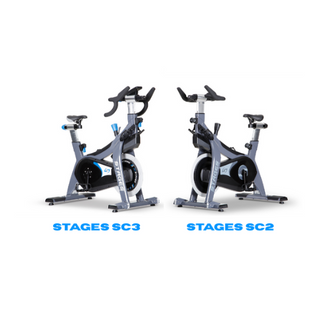
Stages SC2 vs SC3: The Definitive Studio Owner’s Guide (2025)
Since 2015, I’ve personally assembled and tuned thousands of Stages indoor bikes for boutique studios across the U.S. If you’re...
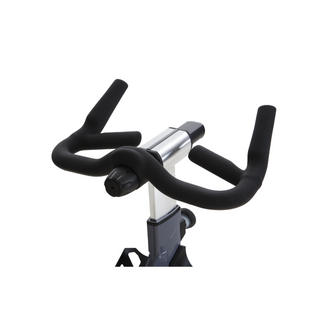
Stages SC2 RhythmBar™ Review: The Ultimate Bike for Rhythm Cycling Studios
Why the Stages SC2 with its RhythmBar™ is the Best Studio Bike for Rhythm Cycling When it comes to indoor...